Apple HomeView Costs $299, but Its Personal AI Features Need Compatible Devices
HomeView starts at $299, but personal requests and AI camera searches also require newer Apple devices, compatible cameras and iCloud+.
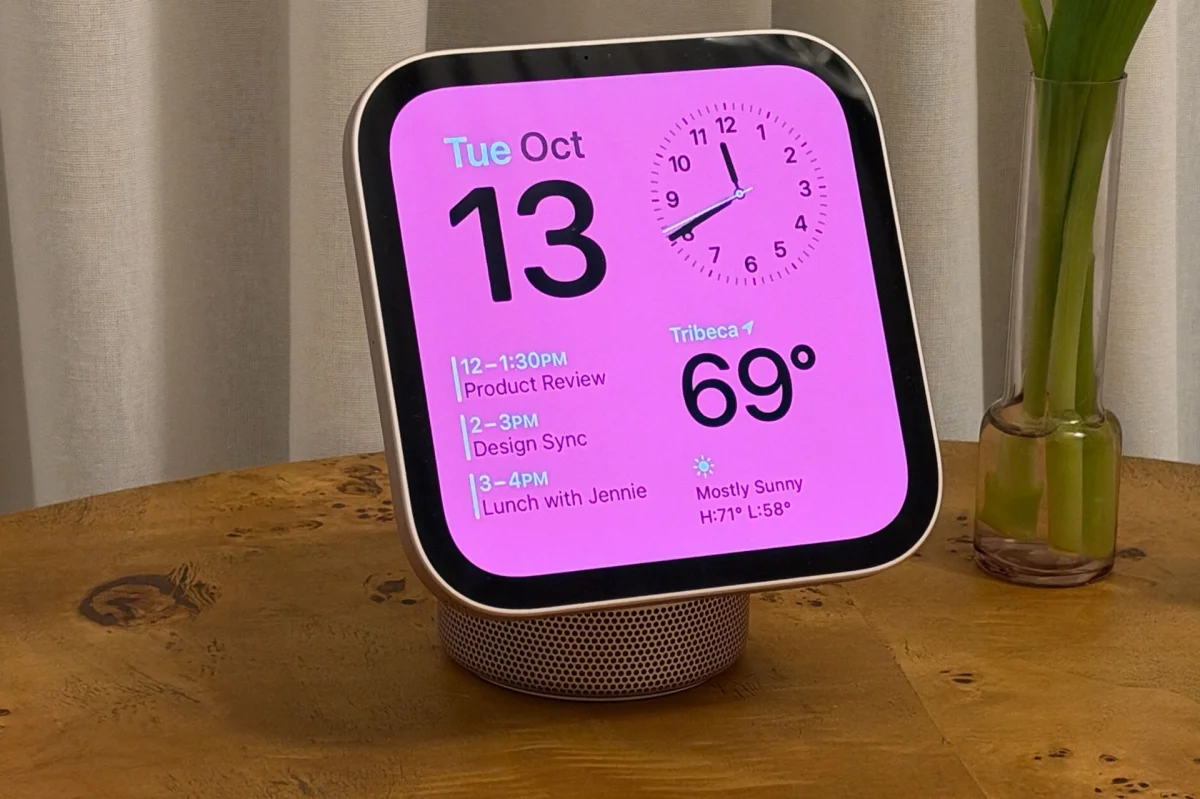
Apple’s HomeView costs $299 / £299 / AU$449 and starts shipping November 13, but the hub’s price doesn’t cover everything needed for its most personal features. Buyers will also need a compatible iPhone or iPad, and some smart camera tools require additional hardware and an iCloud+ subscription.
The distinction matters because HomeView’s face recognition is designed to tailor what each family member sees. It can surface that person’s Messages, FaceTime, Calendar, Reminders and Find My content, avoiding the repeated manual sign-ins that would make a shared screen cumbersome. But access to those personal details depends on an Apple Intelligence-capable device paired with the hub.
Which Apple devices unlock personal requests?
Apple says HomeView setup and multiuser support require a compatible iPhone or iPad running the latest software. Personal Context requests have a higher bar: a paired device must support Apple Intelligence, run the latest software, have Siri AI turned on and use a supported language.
In practical terms, the qualifying devices listed in the source are an iPhone 15 Pro, any iPhone 16 or newer, an iPad mini with A17 Pro, or an iPad with an M1 chip or newer. The standard iPhone 15 doesn’t meet the requirement. So the same $299 hub may feel meaningfully different depending on which phone or tablet a household already owns.
HomeView still has useful functions without a qualifying Apple Intelligence device. It can answer general questions, control compatible smart-home products and improve music discovery. What it can’t do is handle personal requests that draw on information such as a message or calendar entry, or carry out actions across apps. That’s the line between a capable home control screen and the more individualized assistant Apple describes.
There’s a further device restriction for a smaller feature: adjusting Siri’s expressiveness and speaking speed. Apple lists the iPhone 17 Pro, iPhone Air, iPhone 18 Pro, iPhone Duo, or an iPad with an M4 chip and at least 12GB of RAM for that customization. This requirement doesn’t set the threshold for ordinary Personal Context requests, but it does mean some voice controls are reserved for newer hardware.
AI camera tools add more requirements
HomeView’s role in Apple’s smart-home setup extends to HomeKit Secure Video. With a compatible camera, Apple Intelligence can describe activity in recorded footage, such as someone leaving a package or a dog entering the garden. It can also respond to conversational searches, including requests to find when a parcel arrived or when children got home, and bring together notable activity captured by different cameras.
That makes camera history easier to scan than a long list of motion alerts and clips. The trade-off is a longer list of prerequisites. Apple’s camera intelligence needs a HomeKit Secure Video-compatible camera, HomeView or another compatible Apple home hub, an Apple Intelligence-capable iPhone or iPad, and an eligible iCloud+ subscription. Buying the hub by itself won’t provide searchable recordings or AI summaries.
Apple says the footage analysis happens locally on the home hub or through Private Cloud Compute, rather than being handed to the paired iPhone for processing. The paired device is still needed to set up and enable the camera intelligence features, so having a compatible hub and camera alone won’t complete the setup.
iCloud+ plans start at $0.99 / AU$1.49 per month for 50GB. The 200GB plan costs $2.99 / AU$4.49, while 2TB costs $9.99 / AU$14.99 per month. HomeKit Secure Video recordings are kept for 10 days and don’t count toward the usual iCloud storage allowance.
A compatible camera can still provide a live view and basic accessory notifications without paid recorded history. The subscription becomes necessary for storing HomeKit Secure Video footage and using AI tools to analyze and search those saved clips. Buyers should factor that recurring cost into the camera setup if recorded history is part of what they want from HomeView.
Check the household setup before buying
For someone with an iPhone 15 Pro, an iPhone 16 or another listed device, the hub may offer Personal Context without requiring a phone upgrade. A household still using a standard iPhone 15 or an older model may find that HomeView works as a general assistant and smart-home controller, but can’t provide the personal requests that make it feel tailored to each person.
The same calculation applies to the camera features: the hub is only one piece of the setup, alongside a compatible camera, eligible iCloud+ storage and a qualifying Apple device. HomeView’s starting price is clear; the full cost and capability depend on what the household already owns. Checking those devices and subscriptions before ordering is the practical way to know which features will be available from day one.


