HP EliteBook X G2i 14 Review: A Lightweight Business Laptop with a Standout OLED
The EliteBook X G2i 14 pairs a sharp 120Hz OLED with strong business performance and security, but fixed memory and high pricing demand careful configuration.
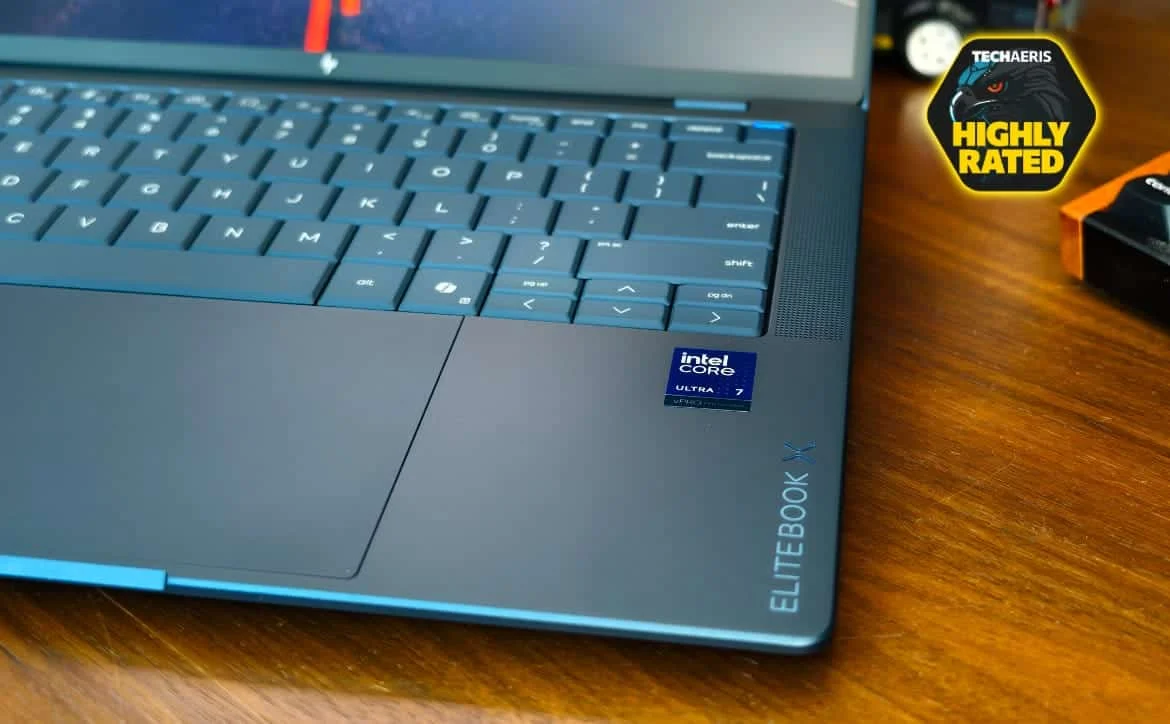
HP’s EliteBook X G2i 14 makes its strongest case as a travel-ready work laptop: it’s light, fast in everyday office tasks, and available with a sharp 3K OLED that’s pleasant to use through long workdays. Its real appeal, though, is the combination of security tools, fleet controls and repair-friendly construction. Those features can justify the price for an organization managing many laptops; a single buyer may find the cost harder to defend.

The reviewed clamshell configuration pairs an Intel Core Ultra 7 366H vPro processor with 32GB of soldered LPDDR5x memory, a 1TB SSD and a 14-inch OLED display. It earned a score of 9.3 out of 10 in the source review. The machine is also offered with different processors, memory capacities and screens, so the reviewed model’s strengths and compromises don’t automatically apply to every EliteBook X G2i 14.

Price and configuration need a closer look
Price figures in the source vary by section: its score card lists $6,270 for the tested model, while the review text gives $4,743 for the configuration and elsewhere calls that the starting price. HP’s pricing can change by model and promotion, and business customers may have negotiated pricing. The source also says the laptop sometimes appears on Amazon at a lower price. Check the exact specification and current price before comparing offers; the panel alone can make a substantial difference to what you’re buying.
HP offers several processors, including Core Ultra 5 and Core Ultra 7 options, plus the Core Ultra X7 358H. Memory choices range from 16GB to 64GB, but the memory is onboard, so you can’t add more after purchase. Storage options include 512GB, 1TB and 2TB drives, with some configurations offering PCIe Gen 5 or self-encrypting drives. The tested unit has 32GB and a 1TB SSD.
The display menu is similarly broad. Options include WUXGA LCD panels, privacy-screen versions, a WUXGA OLED and a 3K OLED; HP also lists a brighter Tandem OLED touch option. The reviewed screen is the non-touch 3K OLED. That distinction matters when comparing prices or ordering several laptops: the same model name can cover machines with very different screens.
The EliteBook X G2i 14 runs Windows 11 Pro in the reviewed configuration, though HP lists other operating system options. Related models include the AMD-based X G2a, the Snapdragon-based X G2q and the convertible X Flip G2i. The tested model uses Wi-Fi 7 and Bluetooth 6.0; cellular connectivity and NFC are optional rather than included on this review unit.
A light chassis with one weak spot

The magnesium chassis is a defining part of the laptop’s appeal. The review describes its finish as Atmospheric Blue, a muted shade that doesn’t show fingerprints as readily as glossy finishes. At around 2.4 pounds in the reviewed description, it’s easy to carry between meetings or pack for a trip. HP lists a starting weight of 2.2 pounds, while the specifications table gives the tested model’s weight as about 2.67 pounds with its 68Wh battery. Those figures differ, so check the weight of the exact configuration you’re considering.
The laptop feels firm across most of its base. The keyboard deck resists pressure, and lifting the machine by a corner didn’t produce creaks or loose seams during the review. The closed lid is less convincing: pressing its center produces visible flex. It didn’t interfere with normal use, but it stands out against the otherwise solid feel.
HP says the model has undergone MIL-STD-810H testing, and the review describes it as suited to the knocks of regular travel. It also lists ENERGY STAR, EPEAT Gold with Climate+ and TCO Certified credentials. These details will matter more to some workplace purchasing teams than to home buyers, but they round out the laptop’s focus on long service in a mobile work setting.
The hinges allow the screen to open with one hand and hold it steady. A physical camera shutter sits beside the infrared camera used for Windows Hello sign-in. Port selection is practical for desk work and travel: two Thunderbolt 4 ports, a third USB-C port, USB-A with charging, HDMI 2.1, a 3.5mm headset jack and a security lock slot. A nano-SIM slot is listed, though mobile broadband requires an optional module. With HDMI and USB-A onboard, connecting to a display or older accessory doesn’t automatically require a dongle.
Typing is a strong point. The backlit keyboard has 1.5mm of travel, a defined feel and keycaps shaped to help keep fingers in place. The reviewer found it comfortable for sustained work and quiet enough for meetings. The compact Up and Down arrow keys are a small adjustment, especially for people who spend much of the day navigating spreadsheets. The power button is set into the top row with enough resistance to reduce accidental presses.
Below it, the large glass touchpad uses haptic feedback instead of a mechanical click. Its response feels consistent across the surface, and the reviewer found gestures and precise pointer control smooth. Taken together, the keyboard and touchpad make the laptop comfortable for the tasks it’s built to handle: writing, working through documents and moving around spreadsheets.
The 3K OLED is the screen to choose for clarity
The reviewed panel is a 14-inch, 16:10 OLED with a 2880 × 1800 resolution, 120Hz refresh rate and variable refresh. HP rates it at 500 nits and 100% DCI-P3 coverage, and adds an anti-glare finish. Text and charts look crisp, while OLED’s per-pixel lighting produces deep blacks without the backlight glow found on LCDs.
The anti-glare coating is useful in bright offices, where ceiling lights and windows can turn a glossy screen into a mirror. The reviewer found the panel usable beneath fluorescent lighting and near sunlit windows, though direct afternoon sun can still make dark text and spreadsheet cells harder to see. HP Eye Ease handles low blue light filtering at the hardware level; the review says it reduces eye strain without giving white documents a strong yellow cast.
This version is non-touch. HP lists a touch-capable Tandem OLED with a 700-nit rating higher in the range, while other builds use WUXGA LCD panels, including an 800-nit Sure View privacy option. That privacy screen’s narrow viewing angles may be useful when working with sensitive material in public, but they can make the image harder to see if you shift out of the ideal viewing position.
OLED’s trade-off is power consumption. HP’s figures in the source put video playback at about 23 hours for this 500-nit panel and about 31 hours for a 300-nit OLED. The numbers come from HP’s internal figures, not the reviewer’s office-work test. Still, they illustrate why a brighter, higher-resolution screen can shorten runtime compared with a lower-power WUXGA option. Buyers who spend more time away from outlets may prefer an LCD configuration; those who look at dense documents all day may find the OLED worth the compromise.
Security and fleet controls are central to the design
HP’s Wolf Security tools are a major reason to consider the EliteBook X G2i 14 in a managed workplace. Sure Start checks the BIOS against a trusted baseline and can restore it if it detects tampering. Sure Click isolates certain browser content and files in a separate environment, while Sure Sense and Sure Run add further protection and monitoring. Tamper Lock can alert administrators if the bottom cover is opened, and the camera shutter provides a simple physical way to block the lens.
The reviewed model also has a fingerprint reader built into the power button, an infrared camera for face sign-in and a TPM. Intel vPro adds remote management features, while HP’s Manageability Integration Kit and HP Connect work with Microsoft Endpoint Manager to support image deployment, driver updates and BIOS settings. For IT staff responsible for many machines, these controls can make standardization and remote upkeep easier than managing each laptop separately.
There are practical details to account for. Sure Click’s isolation features can slow the first opening of some macro-heavy spreadsheets, according to the review. IT staff may also need to adjust alert settings to avoid duplicate warnings from HP services and other security software. The bundled Wolf Pro Security Edition is described as a 36-month license; after that, the organization may need to renew it or rely on the standard Sure Click and Sure Sense versions, which the source says won’t receive future updates.
The security package can make the laptop a better fit for workplaces with strict device requirements, but its value depends on whether those tools will be configured and maintained. Buyers who don’t need centralized controls may be paying for features they won’t use.
Strong office performance, with fan noise under pressure
The Intel Core Ultra 7 366H has 16 cores, boosts to 4.8GHz and includes an NPU rated at 50 TOPS. In the tested laptop, it’s paired with 32GB of LPDDR5x memory. That combination is aimed at heavy multitasking, large spreadsheets, video calls and other office workloads, rather than gaming or demanding 3D work.
The review reports a PCMark 10 Productivity score of 18,859 and an overall score of 9,209. StorageReview recorded the productivity result as the highest it had seen in this class, and the review says it was about 35% ahead of the two Dell Pro systems it compared. These are results reported by the source; they describe its tested configuration and shouldn’t be treated as a guarantee for every version of the laptop.
Everyday responsiveness is helped by the processor and cooling system. The laptop was silent at idle, and the reviewer measured 24.5dB during document work, research and presentations. In Best Performance mode, the processor ran at a sustained 40W limit with short bursts up to 60W. During a one-hour stress test, the chassis reached about 40°C and the reviewer observed no throttling.
That performance has an audible cost. Under sustained load, the fans reached 47.5dB, louder than the business laptops in Notebookcheck’s comparison group. The sound was described as a smooth rush rather than a high-pitched whine, but it will be noticeable in a quiet room. For routine office work the laptop stays quiet; for extended heavy processing, fan noise becomes part of the experience.
Graphics are the clearer limit. The tested configuration uses integrated Intel Graphics with four Xe cores. It can handle multiple 4K displays and hardware video playback, but the review found it unsuitable for demanding 3D rendering or heavy media exports. HP offers Intel Arc B390 graphics with the Core Ultra X7 358H; the source says that version roughly doubles integrated graphics compute and renders at 2.2 times the rate. That is the more appropriate configuration for people who mix office work with creative tasks.
The fixed memory needs planning, too. The reviewed model’s 32GB can’t be upgraded. A 5-billion-digit y-cruncher run exceeded that capacity and wouldn’t start, a reminder that the laptop’s strong office results don’t make it a fit for every memory-heavy workload. HP lists a 64GB option elsewhere in the range. If users rely on virtual machines or similarly demanding applications, choosing enough memory at purchase matters more than usual.

Video calls sound and look clear
A 5MP camera with infrared support handles video calls and face sign-in. A sliding shutter physically blocks the camera, and Poly Camera Pro uses the NPU for auto-framing, studio lighting, background blur and eye-contact correction. The review says these effects can run without placing the same load on the CPU.
The dual microphones use noise reduction and Dynamic Voice Leveling to adjust for changes in speaking distance. Four speakers tuned by Poly Studio make voices clear. Notebookcheck measured maximum output at 88.7dB and found the mids and highs even, though bass is modest. That’s fine for meetings and presentations, but music and video lack the fuller low end of a laptop built with entertainment in mind.
The noise filtering can overdo it in some situations, the review cautions: lower voices may sound filtered, and a nearby speaker can cause the first syllable to be clipped. For frequent calls, the camera, microphones and speakers make a capable built-in setup, but it’s still sensible to check how the audio behaves in your usual meeting environment.
Battery life depends on the screen and workload
The reviewed machine has a 68Wh battery. In the source review’s continuous office productivity test, it lasted 17 hours and 13 minutes with the 3K OLED. That’s a strong result, although it fell short of the LCD-equipped Dell Pro 7 14 in the comparison. HP’s specifications also list a 56Wh battery option, and its stated maximum runtime refers to a different LCD configuration, so figures for one version shouldn’t be assumed for another.
Bright settings, large white documents and frequent video calls can reduce runtime. The review estimates that a day of calls with the camera, lighting effects and microphone filtering active could bring endurance closer to eight or nine hours. That’s a workload estimate in the source, rather than a separate measured result. The practical point is clear: the OLED can last through a workday, but the panel’s brightness and the way you use it matter.
The included 100W USB-C GaN charger supports HP Fast Charge. HP’s stated charging target is about 50% in 30 minutes, and the review reports a full charge in roughly 116 minutes. The 68Wh battery and included charger make it easier to top up between meetings, though users who prioritize the longest possible unplugged stretch should compare the lower-power display configurations.
Repairs are easier than the thin design suggests
Serviceability is a welcome detail in a laptop this light. The review describes a keyboard that can be removed from the top in three steps without screws, plus a replaceable battery kit. The bottom cover is held by four screws. For a workplace maintaining a fleet, that can make common repairs more manageable and help avoid replacing a complete chassis when one part fails.
That repair-friendly approach sits alongside a major limitation: the memory is soldered. Storage choices can be made at purchase, but the reviewed 32GB of RAM is fixed for the life of the laptop. That makes configuration decisions especially important for organizations planning multi-year use. A generous memory option can help the laptop stay useful as workloads grow; a shortfall can’t be corrected with a simple upgrade.
Verdict: a good fit for managed mobile work
The EliteBook X G2i 14’s appeal comes from how its pieces work together: a light magnesium body, comfortable input devices, strong performance in office tests, useful ports, a high-quality OLED option, and extensive security and fleet controls. The review also gives it credit for a design that can be serviced. These are practical strengths for people who carry a laptop every day and for teams that need to manage devices centrally.
Its trade-offs deserve equal attention. The center of the lid flexes, sustained performance brings noticeable fan noise, the tested configuration relies on integrated graphics, and the memory can’t be upgraded. The OLED looks excellent but uses more power than lower-resolution alternatives. And the source’s differing price figures make checking the current price and exact configuration essential.
For an individual shopping primarily on performance per dollar, the EliteBook X G2i 14 may be difficult to justify at its listed prices. For an organization that will use its management and security tools, or a frequent traveler who values the combination of a light chassis and strong screen, it has a clearer case. Choose memory and display carefully: those decisions will shape the laptop’s everyday usefulness long after purchase.
The reviewed package includes the HP EliteBook X G2i 14, a 100W USB-C GaN charger, power cord and documentation. The source lists purchase links for HP and Amazon.


