SteamOS on Apple Silicon: What Steamac Runs, Which Macs Work and the Limits
Steamac runs Valve’s ARM64 SteamOS in a Mac virtual machine, with documented game results and clear limits around DirectX 12.
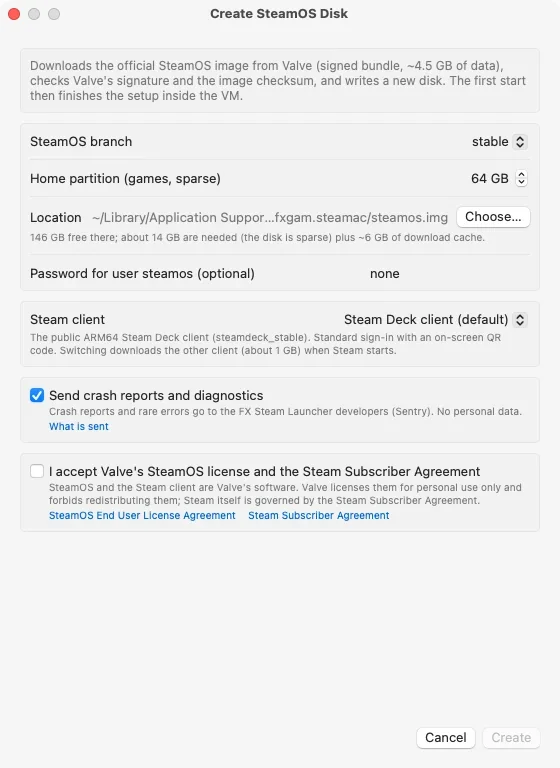
Steamac turns an Apple silicon Mac into a host for Valve’s ARM64 SteamOS, running the Steam Frame build inside a lightweight virtual machine. That gives Mac owners a way to run SteamOS games through Proton while using the Mac’s GPU through Metal. The project’s appeal is practical: it boots Valve’s signed system image, and its developers document working games, hardware results and compatibility limits.
This is a full virtual machine rather than a compatibility layer inside macOS. Steamac builds on Apple’s Hypervisor.framework and libkrun. Its launcher downloads the image, checks its signature and checksum, then writes it to a sparse disk. It doesn’t require Docker or a third-party SteamOS fork.
Setup and graphics
The stated requirements are an Apple silicon Mac running macOS 15 or later and about 20GB of free space: roughly 14GB for the disk and 6GB for the download cache. The disk expands as games are installed. The app is signed and notarized by Apple, and it chooses virtual CPU and memory settings for the Mac automatically. Users can adjust them, though the launcher warns about assigning more resources than the machine can handle.
Memory allocation matters because the virtual machine and games share the Mac’s unified memory. Steamac accounts for GPU memory when setting the VM budget, helping limit the chance that a game pushes the system into swap. That makes memory headroom a useful consideration for anyone planning longer or more demanding sessions.
The graphics route links several components. Proton 11 converts DirectX calls into Vulkan inside SteamOS. Venus sends those calls out of the VM through virtio-gpu, and virglrenderer replays them on the Mac using a Vulkan driver running on Metal. SteamOS identifies the graphics device as “Virtio-GPU Venus (Apple M4 Max)” and reports Vulkan 1.4 support.
For x86 games, FEX translates instructions to ARM64. Steamac says Apple silicon’s hardware support for strong memory ordering helps here: a guest kernel patch exposes that capability through PR_SET_MEM_MODEL, allowing FEX to use it instead of emulating memory barriers in software. The project credits this detail as a significant part of making the setup perform well.
Users choose between two Vulkan drivers in Settings, under Advanced and Vulkan driver. KosmicKrisp, based on Mesa on Metal 4, requires macOS 26 or later and is the default where available. MoltenVK is a UTM fork with Steamac patches for geometry shaders, transform feedback and descriptor heaps containing up to one million entries. It supports every Mac covered by the project.
Games that run, and the Macs behind them
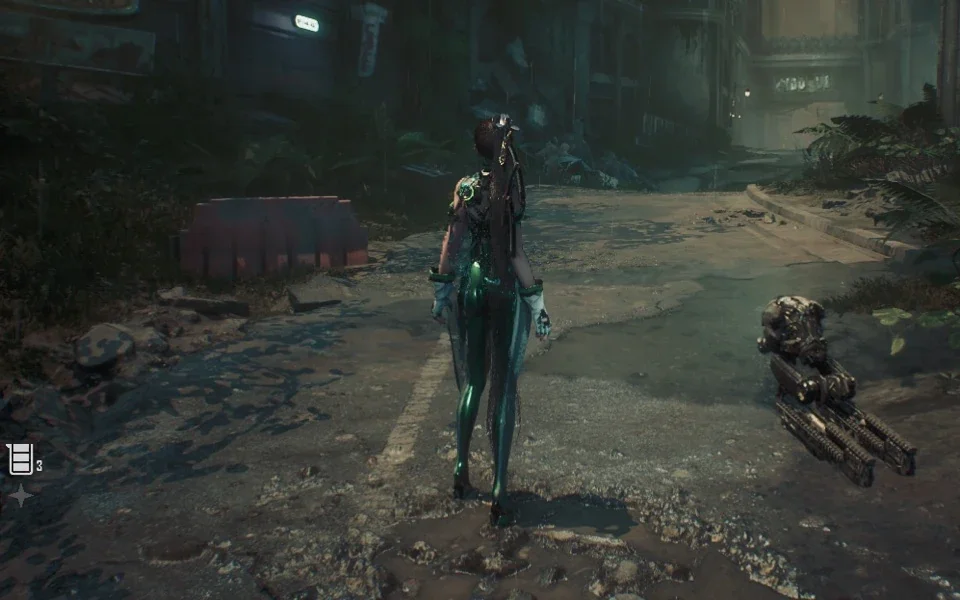
Steamac lists specific results across different games and graphics APIs. Death’s Door was the first title to run, using DirectX 11 through DXVK. Heroes of Might and Magic: Olden Era played for seven minutes without an error. Diplomacy is Not an Option ran as a Windows x86-64 game through Proton 11 and FEX. Stellar Blade Demo and Resident Evil 2 worked with DirectX 12, while Dragon’s Dogma 2 ran with KosmicKrisp on M2 and newer chips.
The project reports GPU acceleration throughout, along with working controllers and audio. Gamepads recognized by macOS appear in SteamOS in the same controller category, including DualSense, DualShock 4 and Xbox pads, with rumble support. Audio uses CoreAudio and can go to outputs such as AirPods or external DACs. The launcher supports up to 12-channel output.

The published performance figures point to Max chips for demanding DirectX 12 games. On an M4 Max, Stellar Blade Demo held 60 FPS at 1280×800 with MoltenVK. An M5 Max ran Dragon’s Dogma 2 at around 40 FPS at 720p with KosmicKrisp. Those results suggest the Max tier is the safer choice for players who want demanding games to feel comfortable, especially during longer sessions; the source also points to the 16-inch MacBook Pro’s larger thermal envelope as a safer fit for sustained play.
An M1 Max marks a much more modest starting point for DirectX 12. In Stellar Blade Demo, Steamac reports roughly 29 FPS with KosmicKrisp and about 18 FPS with MoltenVK. DirectX 11 looks considerably stronger: Death’s Door’s title screen reached around 117 FPS on an M1 Max using the experimental DXMT path, compared with roughly 41 FPS before.
For libraries weighted toward DirectX 9, 10 and 11, the project says M1 Pro, M1 Max, M2 and M3 systems can do the job. The biggest dividing line in its guidance is DirectX 12, with some games also requiring M2 or newer. Since the VM and game draw from the same memory pool, buyers should consider memory capacity alongside the chip.
Compatibility limits and first-run waits
Neither graphics driver covers every DirectX 12 feature. KosmicKrisp reaches feature level 12_0, while MoltenVK reaches 11_0; both support shader model 6.0. Games requiring feature level 12_1 or shader model 6.6 won’t start, a limitation that includes most Unreal Engine 5 titles. Games whose anti-cheat systems block virtual machines are also out of reach.
New effects can briefly stutter while Metal compiles a graphics pipeline. Steamac reports pauses of 50 to 100 milliseconds, after which the pipeline is cached, including across VM restarts. Initial shader compilation can take longer: Stellar Blade Demo took about 28 minutes on an M1 Max with KosmicKrisp. Dragon’s Dogma 2 compilation fell from 62 minutes to about 8.5 minutes after version 1.9.4 added multithreaded compilation and an on-disk cache.
Active development, with a specific audience
The changelog shows steady work on compatibility and performance. Version 1.8 brought feature level 12_0 to KosmicKrisp. Versions 1.8.2 and 1.9.1 addressed GPU timeouts during Steam startup on M3 and newer chips, and GPU losses in Path of Exile 2 and The Witcher 3. Version 1.9 added Russian and Simplified Chinese launcher support and multichannel audio; 1.9.2 introduced the experimental DirectX 11-to-Metal route through DXMT; and 1.9.4 made Dragon’s Dogma 2 run.
For someone who already owns an Apple silicon Mac and mainly plays DirectX 11 games, Steamac looks like a reasonable way to try SteamOS, provided the game’s specific compatibility requirements fit. Anyone choosing a Mac primarily for DirectX 12 gaming should use the project’s results as a guide: favor a Max chip and ample unified memory, and check the supported feature level before expecting a game to launch.