Corsair HX1000i Shift Crystal Review: Per-Pin Monitoring Meets a See-Through Case
Corsair's 1000W HX1000i Shift Crystal adds per-pin 12V-2×6 monitoring and a see-through shell for £249.99. Here's who it suits.
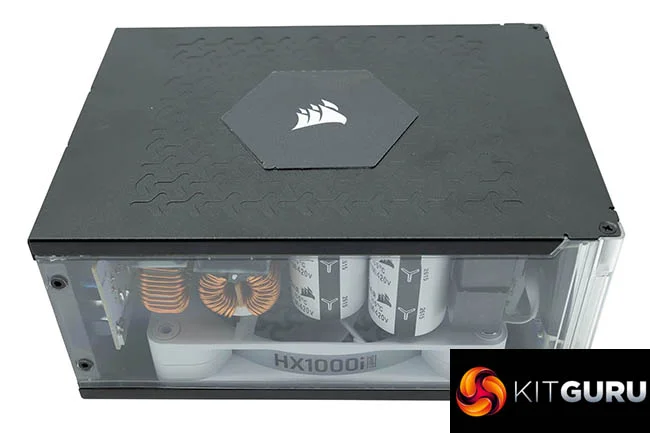
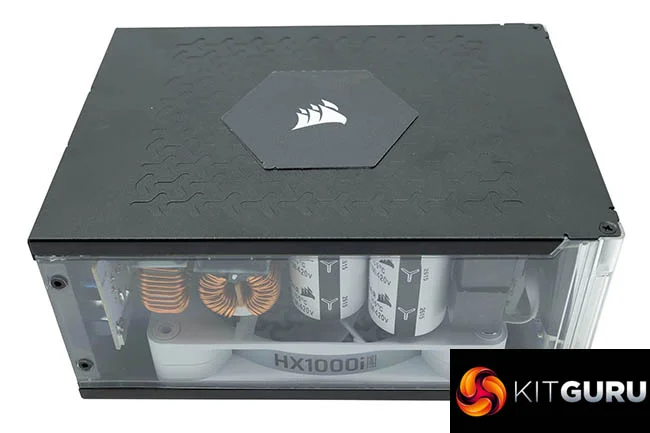
If you want a power supply that doubles as a display piece, Corsair's HX1000i Shift Crystal is one of the more unusual options available. It's a 1000W unit with transparent panels on three sides, and it combines side-mounted modular connectors from the HXi Shift range with a 140mm RGB fan, individually sleeved cables and Cybenetics Platinum certification. The feature I'd look at first is PinProtect+, Corsair's configurable protection for the 12V-2×6 connector.
Why PinProtect+ is the interesting part
High-end graphics cards draw a lot of current through a single connector, and the load doesn't always split evenly across its six power pins. An uneven split can push one pin well above the others, which is why per-pin visibility has become a talking point for GPU power. Corsair's approach is to measure the current on each pin and show it in iCUE. Users can set a threshold and an activation delay. If a pin stays above the threshold for long enough, PinProtect+ reduces power so the GPU shuts down, which Corsair says helps prevent potential damage.
My read is that the value here depends on how you set it. A threshold that's too tight could trip during normal gaming spikes, and one that's too loose defeats the point. The sensible approach is to run your card under a sustained load, watch the per-pin readings, and then set limits with some margin above what you see. That's a bit more work than a set-and-forget protection, but it gives you data about your own card rather than a generic number.
Transparency and the internals
The see-through shell is the obvious draw, though how much of it you'll see depends on your case. A glass-fronted build with a tall, open view will show the unit off. In a case with a solid front or a bottom-mounted PSU shroud, most of the transparency will be hidden. Corsair has carried the styling into the internals with white circuit boards and matching Corsair-branded capacitors. That's a nice touch for builders who care about a consistent look, and it's the kind of detail that matters only if the unit is visible.
Corsair also lists 105°C electrolytic capacitors and a fully digital platform with a resonant LLC topology and DC-to-DC conversion. Corsair says this combination delivers clean, consistent power and reduces coil whine. Digital control generally allows tighter regulation and more precise fan and load management, while DC-to-DC stages reduce the number of high-ripple conversions on the 12V rail. Whether that translates into audible differences at your desk is something a test bench and a quiet room will answer better than any spec sheet.
Cooling and noise
The 140mm fan uses a magnetic dome bearing and supports Zero RPM operation. Corsair says the fan switches off entirely at low to medium loads for near-silent running. In practice, this is where most PSUs earn or lose their reputation for quiet operation: the stop-start point and the ramp curve matter as much as the peak noise figure. Corsair also describes a three-dimensional Y-pattern grille, inspired by its FRAME cases, which it says offers a less restrictive airflow path. That's a manufacturer claim, and I'd want to see it reflected in temperature and noise results before taking it at face value.
iCUE LINK and modular cabling
The Crystal includes an integrated iCUE LINK System Hub, so you don't need to run a six-pin PCIe cable to power an iCUE LINK cooling setup. Corsair says the hub supports up to 24 iCUE LINK devices across two channels. If you already run iCUE LINK fans or a radiator, that's a tidy way to cut cable clutter. If you don't, the hub is a feature you won't use, and it doesn't change the core power delivery.
The cabling is fully modular and individually sleeved, so you only connect what your system needs. Dual EPS12V connectors are included for motherboards and high-end CPUs that need them. For a case with a transparent side panel, sleeved cables that match the internals are the difference between a tidy build and a tangle that shows through the glass.
Price, warranty and efficiency
Corsair quotes a UK price of £249.99 and backs the unit with a ten-year warranty. The Cybenetics Platinum certification is tied to a claimed efficiency of up to 91%. That figure matters most at mid-range loads, where most gaming and everyday PCs spend their time, so I'll be checking the efficiency curve rather than the peak number. Price is the question I'd weigh against what you'd pay for a non-transparent unit with similar specifications, and whether the transparency and PinProtect+ are features you'll use.
Who should look at it
The HX1000i Shift Crystal makes the most sense for builders with a glass-sided case who want the PSU to be part of the visual build, and for anyone running iCUE LINK hardware who'd like the hub built in. Buyers who mostly hide their PSU, or who don't plan to use iCUE software, have cheaper ways to get similar wattage. What I'll be watching in the full testing is how the per-pin readings behave under sustained GPU load, how quiet the fan stays through the ramp, and whether the efficiency holds up where most PCs actually run.