ESP32 and ST7789V Build a Compact Wi-Fi and Serial ANSI Terminal
This ESPHome project turns an ESP32 and a small ST7789V screen into a color ANSI terminal with Wi-Fi, USB serial and baud controls.
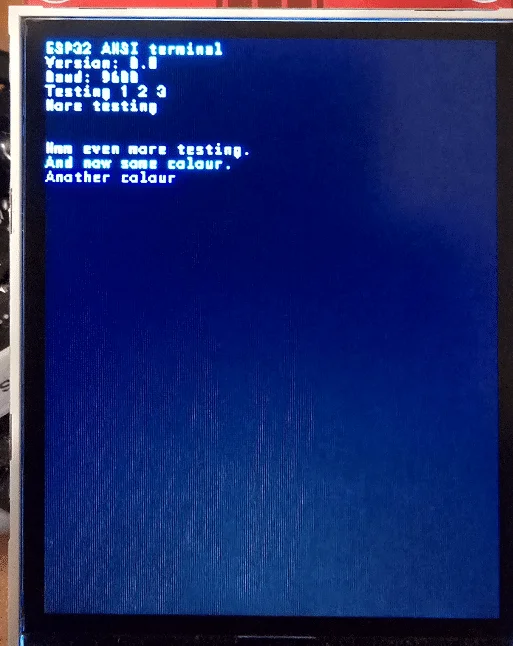
A small ST7789V display and an ESP32 can make a useful text terminal, with ANSI color and cursor control over Wi-Fi or USB serial. The project brings together an ESPHome display, a scrolling text buffer and a TCP connection, with a web interface for a few settings. It’s a personal experiment rooted in an earlier Z80 terminal project, but the result has practical uses for anyone who wants a compact screen for incoming text.
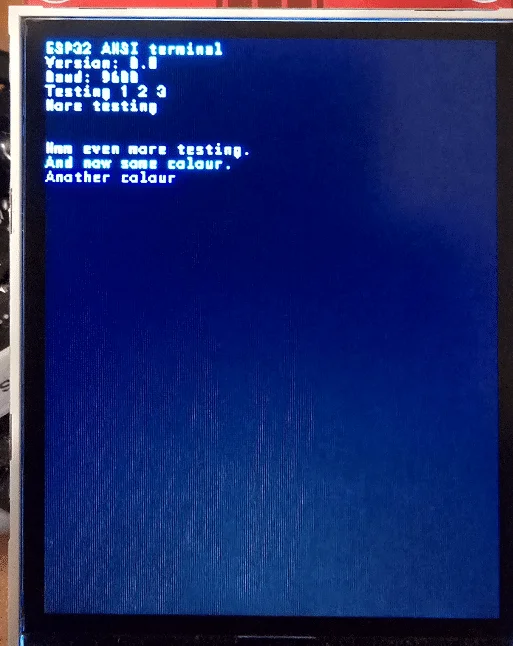
The builder developed the terminal after spending several weeks programming an ESP32 and ST7789V display for another project. A previous text terminal, built in assembly for a Z80 and a large pub monitor, had eventually grown into an advertising system with blocky graphics. This new version is smaller in scope: it accepts text and terminal commands, then renders them on a 320 × 240 display.
Two ways to send text
The terminal accepts input through the ESP32’s USB serial connection, set to 9600 baud by default, or over Wi-Fi through a TCP server listening on port 2323. The author reports using MobaXterm to send text, ANSI screen-clearing commands and color controls. Backspace is supported, and text can also be sent from another device over the serial interface.
The display uses a Roboto Mono font at 8-point size. The article reports 40 characters per line and 39 lines, with scrolling when the text reaches the bottom. The header file sets the terminal buffer to 48 columns by 39 rows, while the display is 320 pixels wide; the author’s reported 40-character view may reflect the usable layout in practice. MISO is not connected, and the display board is the non-touch version.
There’s a small but useful distinction between the two input paths. When a TCP client connects, the ESP32 sends Telnet negotiation bytes intended to turn off the client’s local echo, then echoes typed characters itself. Serial input is also echoed to the connected TCP client, so a network terminal can monitor activity arriving through the physical serial port. The code filters Telnet negotiation data before passing ordinary input to the ANSI parser.
Hardware connections
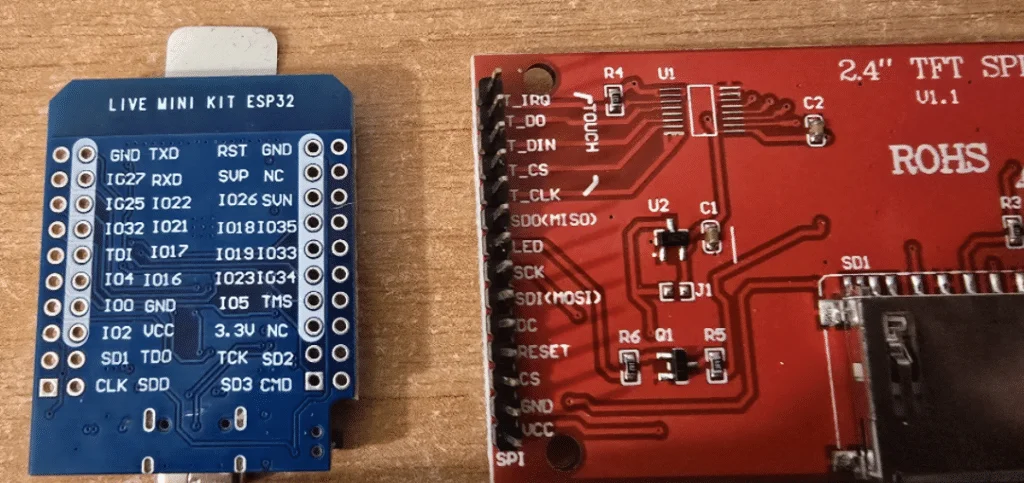
The wiring uses the ESP32’s hardware SPI interface for the display, plus two GPIO pins for an external serial terminal. The author used a larger ESP32 WROOM-32 board, describing its memory as useful for the scrolling buffer. The listed connections are:
- Display VCC to 3.3V and GND to GND.
- Display SCK to GPIO22 and SDI/MOSI to GPIO21.
- Display CS to GPIO25, DC to GPIO16 and RESET to GPIO17.
- Display LED to GPIO4 for backlight control.
- External terminal TX to GPIO26, which is the ESP32 RX input.
- External terminal RX to GPIO27, the ESP32 TX output, with ground connected to ground.
The display’s backlight is exposed in ESPHome as a monochromatic light, using a PWM output on GPIO4. Its configured restore mode is ALWAYS_ON. The display refreshes every 250 milliseconds, uses a 20 MHz data rate and has a 12% buffer size in the YAML configuration.
ANSI features and limits
The parser covers a useful set of common ANSI terminal operations. It handles standard and bright foreground and background colors, the 256-color palette, bold, dim, underline and reverse video. It can clear all or part of the screen or current line, move the cursor, save and restore its position, and show, hide or change the blinking behavior of the cursor.
The 256-color support includes the standard 16 colors, a 216-color cube and 24 shades of gray. The code maps those values to RGB colors for display. A white cursor block is drawn at the current position, with the character beneath it rendered in black. Tabs advance to the next eight-column stop, while backspace moves left and erases the previous character.
This is a focused implementation rather than a claim of full terminal compatibility. The article says the build hasn’t been fully tested, and the code only handles a defined set of ANSI sequences. That should be enough for basic status text, colored output and simple terminal interaction, but software that depends on unsupported terminal behavior may not display as expected.
ESPHome setup and controls
The project uses ESPHome with the Arduino framework and the ESP32 DevKit board definition. The YAML includes the terminal header file, configures the ST7789V display and font, and starts the terminal object from a five-millisecond interval. The logger’s baud rate is set to zero, while the terminal itself starts its serial connection at 9600 baud.
Wi-Fi credentials are supplied through ESPHome secrets. The sample lists seven possible SSIDs, all using the same password, because the author moves between several access points at home. A simpler setup can remove the extra network entries and keep only the SSID or SSIDs it needs.
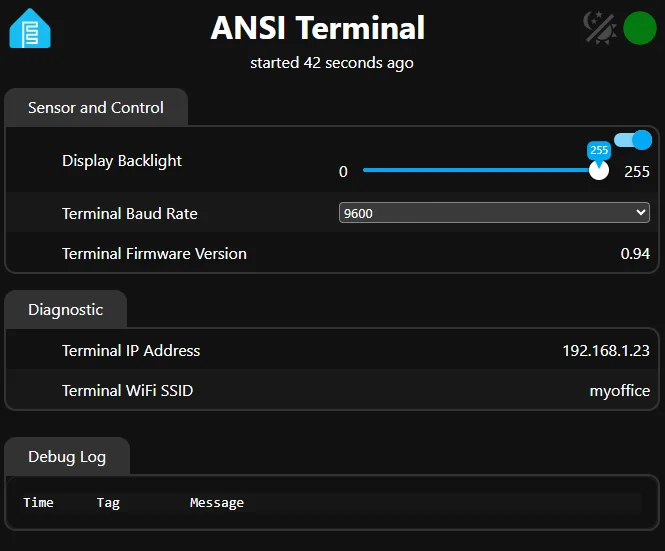
The ESPHome web server runs on port 80 using version 3. Its interface exposes the terminal’s IP address and connected Wi-Fi network, along with a firmware version text sensor. It also provides a baud-rate selector with options from 1200 through 230400. Changing the selection calls the terminal’s baud-setting function, which updates the ESP32 serial rate and prints a confirmation message to the terminal.
The header also supports out-of-band commands that begin with a tilde at the start of a line. ~BAUD? reports the current serial rate, ~BAUD 19200 changes it when the requested value is within the accepted range, and ~CLEAR clears the screen. The implementation accepts baud rates from 300 to 2,000,000 through this command path; the web selector offers a shorter list of preset values.
Building from the supplied files
The author provides an ESPHome YAML project named ansi_terminal.yaml and a C++ header named ansi_terminal.h. The YAML is the more approachable place to adjust font settings and Wi-Fi details. The header contains the display buffer, input handling, ANSI parser and rendering logic, and the author describes it as less convenient to modify.
The stated hardware cost is only a few euros for the non-touch ST7789V board, though the article gives no specific price or supplier. It also makes no guarantee that every setup will work without adjustment. For builders already using ESPHome, the project offers a direct route to a small network-accessible text display, with serial input available when Wi-Fi isn’t the right connection.
The most compelling use is simple: put incoming status text on a dedicated screen, with enough color and cursor movement to make it readable. The project’s next test is likely to be compatibility with the particular terminal software and ANSI sequences a builder expects to use.


