iMessage Encryption Can Quietly Switch to Less Secure Messaging
Messages can fall back from iMessage to RCS, MMS or SMS with limited warnings. Check the Info pane and review iCloud backup settings.

iMessage’s blue bubbles and encryption labels can give a conversation a steady sense of security. But Messages may change the protocol it uses partway through a chat, and the warning can be easy to miss. The key detail for users is that a conversation’s name and history don’t guarantee every message in it has the same protection.

Apple introduced iMessage in 2011 as an end-to-end encrypted messaging service. Its encryption keys are stored on users’ devices, so Apple says it can’t read messages as they travel between devices. The service has a strong record: attacks over the years have involved compromised devices or data extracted from iCloud backups, rather than a breach of iMessage’s core protocol.
Apple has added safeguards, including the optional Contact Key Verification feature, which helps users confirm they’re communicating with the intended person. But the everyday Messages interface raises a different question: what happens when iMessage isn’t available, even though you’re still looking at the same conversation?
One conversation can use several protocols
Messages supports iMessage, RCS, MMS and SMS. iMessage is encrypted. RCS encryption depends on the devices and carrier involved: every non-Apple device in the chat must support a recent enough version, and the carrier must allow it. SMS and MMS aren’t encrypted. SMS carries text, while MMS supports media and group messages.
Messages groups these exchanges into conversations, keeping the interface simple. That convenience can obscure a change in how messages are sent. A chat that began as an encrypted iMessage exchange might later use RCS, MMS or SMS if circumstances change. The order of preference is iMessage, encrypted RCS, unencrypted RCS, MMS, then SMS.
At the start of an iMessage chat, Messages provides several cues: a contact’s address appears in blue, the conversation identifies itself as iMessage and encrypted, and your messages appear in blue. The Info pane also says that iMessage conversations are end-to-end encrypted. Those cues describe iMessage’s protection, but they don’t ensure that the conversation will keep using iMessage.
If the service switches protocols, Messages may identify the change inline beside the messages. That label can be subtle, and there may be no pop-up or other prominent alert. A user who assumes the whole conversation remains encrypted could miss that its protection has changed.
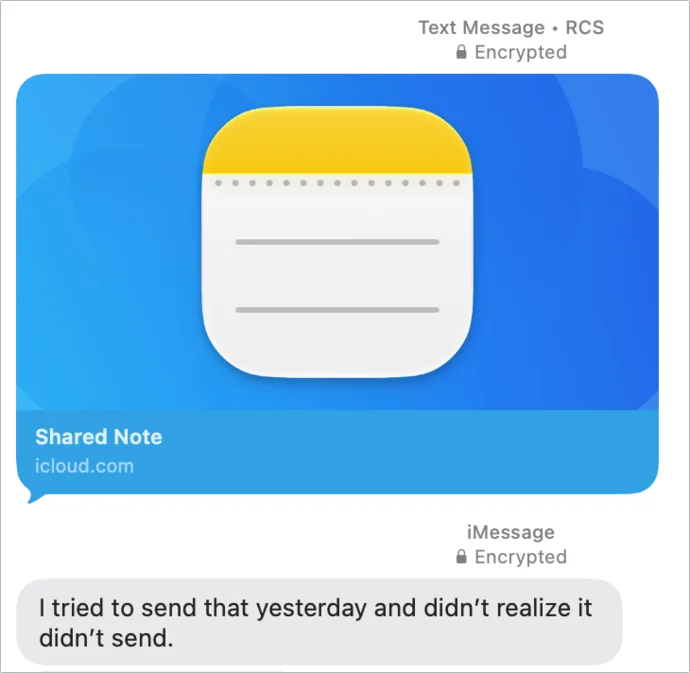
In one example from the author’s own messages, a long-running chat with his wife temporarily switched from iMessage to RCS. The reason wasn’t clear, and Messages didn’t show a prominent security alert. RCS encryption kept that exchange protected, even though it wasn’t using Apple’s iMessage encryption; later, the conversation returned to iMessage.
Group chats can change too. Adding someone whose device doesn’t support iMessage or encrypted RCS can move a group from encrypted iMessage to unencrypted RCS. Messages shows the new state inline, but the shift may not be obvious unless you notice the label.
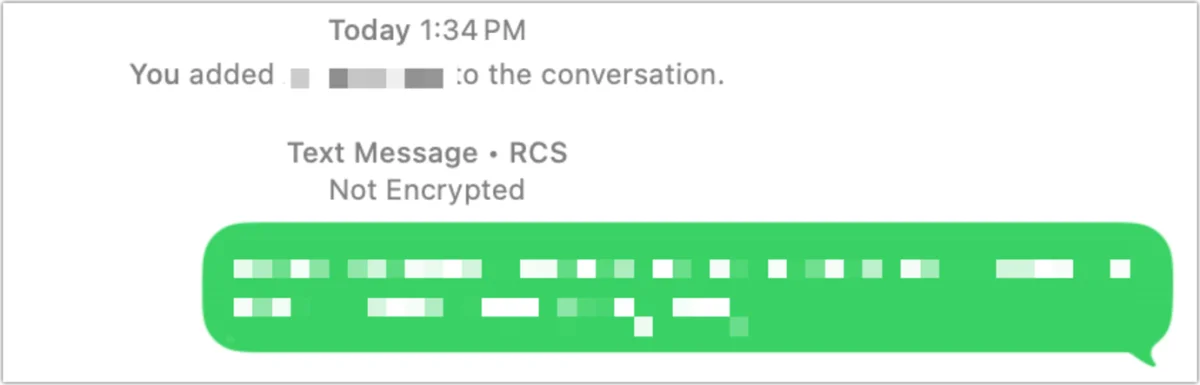
Where to check the current encryption status
The Info pane provides the clearest check of a conversation’s current state. It distinguishes unencrypted RCS from end-to-end encrypted RCS, though the information appears in small text at the bottom of the pane. If Messages is using RCS, Apple also says it can’t verify the software on receiving devices. That caveat reflects Apple’s reliance on infrastructure it doesn’t control.
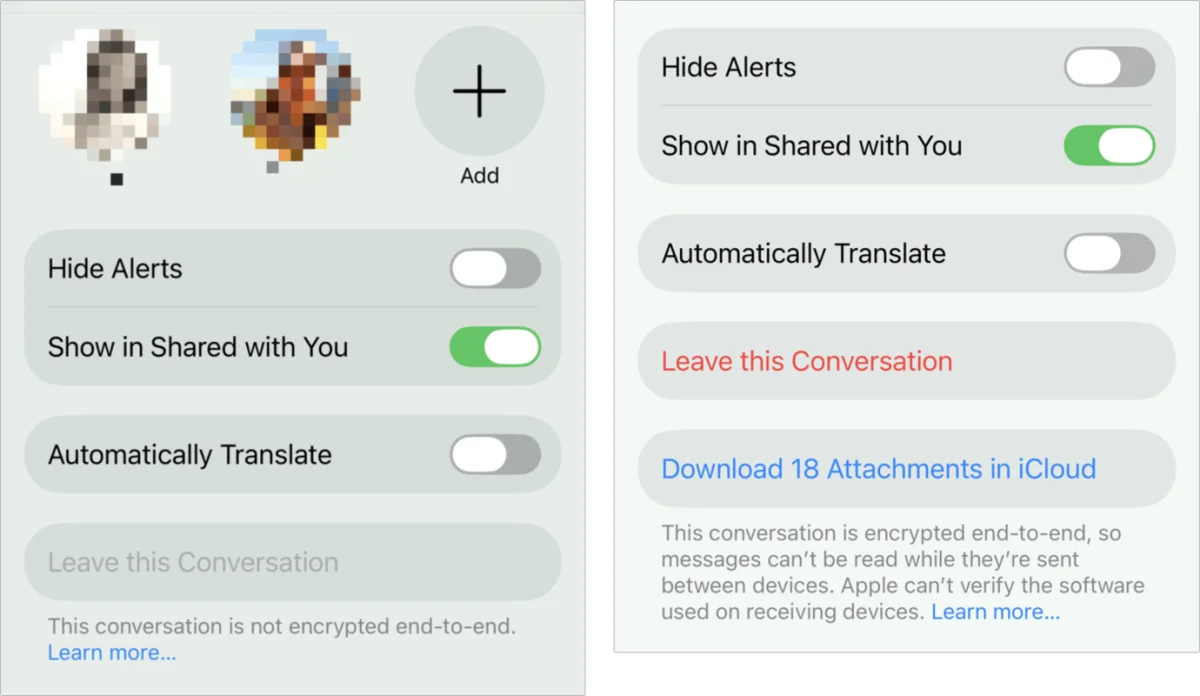
For most users, these protocol changes aren’t a reason to panic. Still, anyone who depends on encryption should check the Info pane rather than treating a chat’s blue beginnings as proof that every later message has the same protection.
Some settings can limit automatic fallbacks. On an iPhone, go to Settings, then Apps, then Messages. These controls aren’t available from an iPad or Mac.
- Turn off Retry as Text Message. Messages won’t retry failed iMessages as SMS, but some messages may not get through. This setting also can’t stop other people from sending SMS or MMS when their iMessage attempt fails.
- Turn off RCS Messaging. This prevents fallback to both encrypted and unencrypted RCS. Messages doesn’t offer a setting to block only unencrypted RCS, which would give users more control while retaining the encrypted option.
- Turn off MMS Messaging. Messages may try MMS even when SMS retry is disabled, so this setting can close that route too.
Each choice can affect whether a message gets delivered, and disabling RCS removes its encrypted option along with the unencrypted one. The controls offer a way to reduce fallbacks, but they don’t replace checking what Messages is using in a particular chat.
iCloud backups add another privacy consideration
There’s also a separate issue for Messages synced through iCloud. In some configurations, an iPhone or iPad backup can contain the Messages in iCloud encryption key. If someone gains access to an Apple Account and obtains that backup, the key could help them decrypt stored messages. This backup path is the important exception to the usual end-to-end encryption protection described for iMessage.
Two options can address that exposure. Advanced Data Protection adds end-to-end encryption to nearly all data stored in iCloud, with email, calendar entries and contacts excluded. It can make recovery harder if all a user’s devices are lost, stolen or destroyed, and it isn’t available in the United Kingdom.
The other option is to disable iCloud Backups. Messages data then isn’t included in a restorable iCloud backup, so its encryption key isn’t uploaded in that backup. A computer backup on a Mac or Windows machine is another route, though it takes more effort; much of the data users want to keep may already sync through iCloud.
Messages gives users several visible signals when a chat is using iMessage, yet its fallback labels can be easy to overlook. Checking the Info pane and choosing an iCloud backup approach that fits your needs are practical ways to understand where your messages are stored and how they’re protected.
Contact Key Verification is optional. It adds a way to verify a contact’s identity in iMessage, though it may be more than most users need. The author previously explained how it works.
The author was updating Take Control of FaceTime and Messages, a guide to FaceTime, Messages and Phone. The update was due the following week and would cover version 27 operating systems; buyers of the current edition were to receive the update at no extra cost.
For encrypted RCS, Google says users need the latest version of Google Messages but doesn’t specify a version number. Apple devices need version 26.5 or later and a supported carrier; Apple lists carrier support.
Apple’s support pages explain Messages in iCloud, Advanced Data Protection, its data coverage and recovery details, and its availability in the United Kingdom. Apple also explains the difference between iCloud Backup and computer backups.


